ShForm Form Builder ShForm Form Builder
  • Home 
  • Templates 
  • Integrations 
  • Plans & Pricing 
Login Sign Up

Home > Help Articles > Question types

Adding Title or Heading on Forms

A Heading in ShForm is a layout element used to add titles and section headers inside a form. It helps structure the form by clearly separating different sections and making long forms easier to understand. The Heading element does not collect any user input on the form and is used only for visual and structural purposes.

Note: When a new form is created in ShForm, a default heading is automatically added at the top of the form. You can click on it to change its text or delete it.

Why Use Headings on Forms?

Headings allow you to:

  • Improve form readability and structure
  • Organize form sections
  • Label groups of related fields
  • Add titles to multi-step form sections

How to Add a Heading on Forms in ShForm
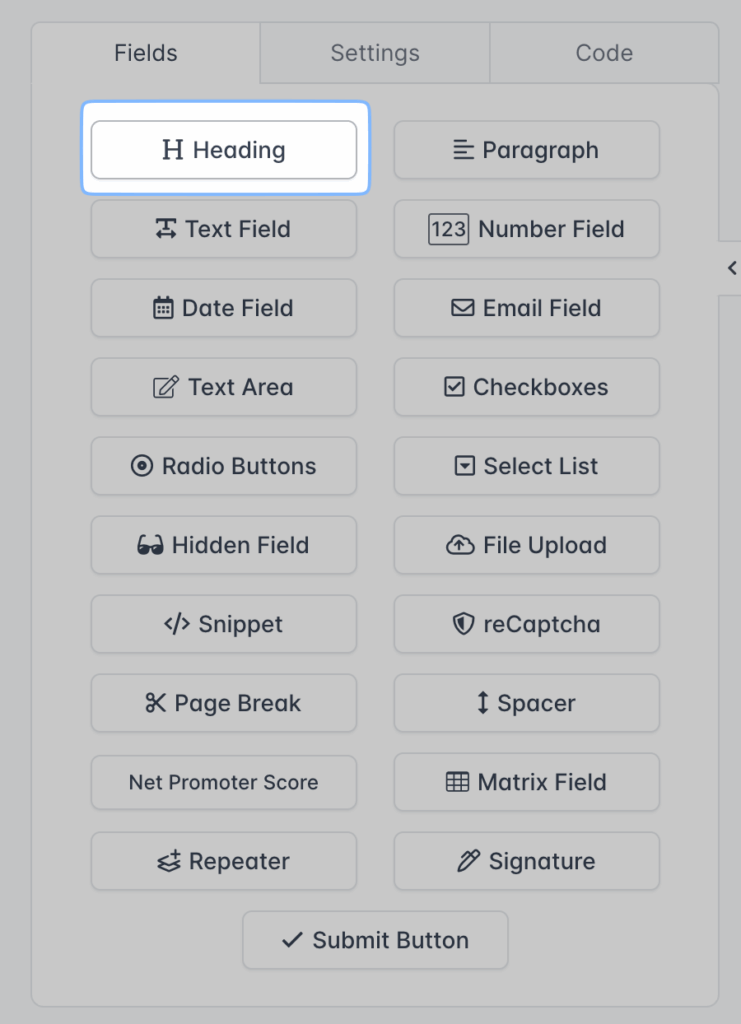
Adding Title or Heading on Forms

To add a Heading element to your form:

  1. Open your form in the ShForm Form Builder
  2. Go to the Fields tab in the left panel
  3. Click on Heading or drag it into the form preview
  4. The heading will appear in the form
  5. Click on the heading text to edit it
  6. Save the changes

The Heading element can be placed anywhere in the form using drag and drop.

How to Edit a Form Heading in ShForm
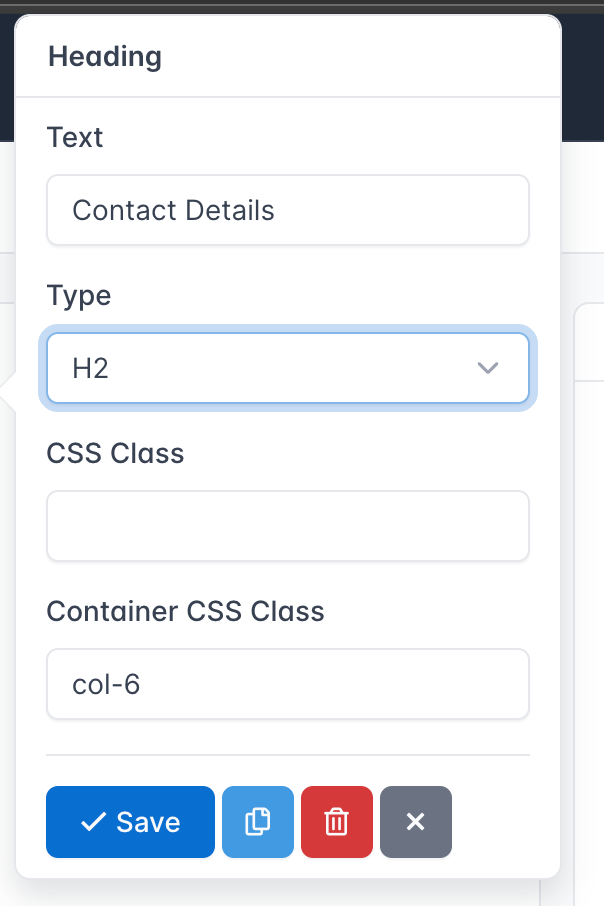
Editing heading on forms

To edit an existing heading:

  1. Click on the heading inside the form preview
  2. A settings pop-over will appear
  3. Update the heading text
  4. Modify heading settings if needed
  5. Click Save

Heading Settings in ShForm

The Heading element supports the following settings:

Heading Text

Defines the title displayed inside the form.

Heading Level

Choose the HTML heading level:

  • H1
  • H2
  • H3
  • H4
  • H5
  • H6

This controls the hierarchy and appearance of headings within the form.

CSS Class

Add custom CSS classes for styling the heading using themes or external CSS.

By default, ShForm supports grid layout classes from col-1 to col-12. These classes allow you to control the width of the heading when building multi-column form layouts.

You can add one or multiple CSS classes by separating them with spaces. These classes are applied directly to the heading element and can be used with your form theme or external stylesheets.

Designing the Heading in ShForm

ShForm allows you to customize the visual appearance of headings using the Design section located on the right side of the Form Builder screen.

To design a heading, select the Design panel and click on Heading. All changes made here apply to heading elements within the form.

How to Access Heading Design Settings
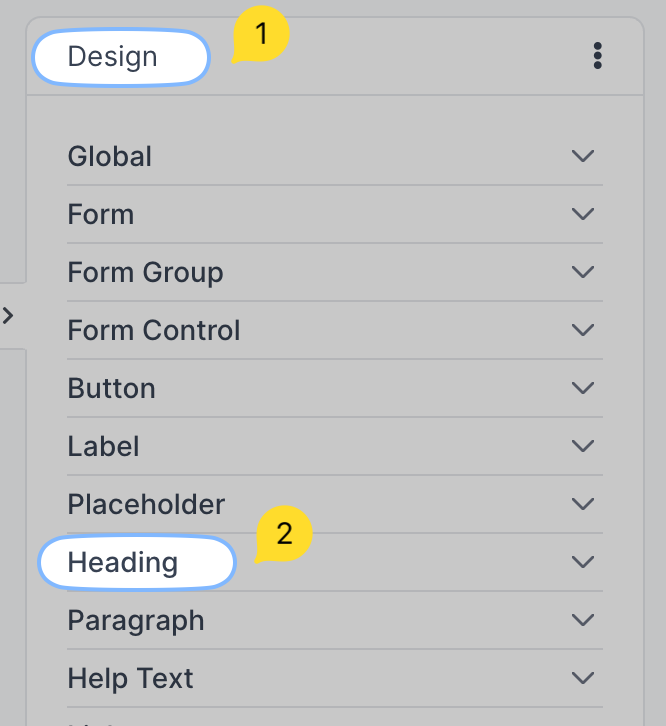
Designing heading on shform
  1. Open your form in the ShForm Form Builder
  2. Look at the right side of the screen
  3. Click on the Design tab
  4. Select Heading from the design options

Available Heading Design Options

The Heading design panel allows you to customize the following properties:

  • Text color
  • Font family
  • Font size
  • Font weight
  • Text alignment
  • Line height

All design changes are applied in real time and reflected immediately in the form preview.

These design settings affect only the visual presentation of headings and do not impact form data or submission behavior.

Have more questions? Submit a request

  • Integration
  • Question types
  • UI Widgets

How you ask is everything.

SIGN UP FREE

INTEGRATIONS

Google Sheets

Zapier

Salesforce

Hubspot

All apps & integrations

PRODUCT

Pricing

FAQs

Discount request

Blog

Contact us

TEMPLATES

Booking Forms

Contact Forms

Registration Forms

Appointment Forms

All Templates

GET TO KNOW US

Terms

Privacy

Refund Policy

Report Abuse

© 2025 ShForm™

[rcb-consent type=”change” tag=”a” text=”Privacy Settings”]

Cookie Settings

Privacy settings

Decide which cookies you want to allow.

You can change these settings at any time. However, this can result in some functions no longer being available. For information on deleting the cookies, please consult your browser’s help function.

Learn more about the cookies we use.

With the slider, you can enable or disable different types of cookies:

  • Block all
  • Essentials
  • Functionality
  • Analytics
  • Advertising

This website will

This website won't

  • Remember which cookies group you accepted
  • Essential: Remember your cookie permission setting
  • Essential: Allow session cookies
  • Essential: Gather information you input into a contact forms newsletter and other forms across all pages
  • Essential: Keep track of what you input in a shopping cart
  • Essential: Authenticate that you are logged into your user account
  • Essential: Remember language version you selected
  • Functionality: Remember social media settings
  • Functionality: Remember selected region and country
  • Analytics: Keep track of your visited pages and interaction taken
  • Analytics: Keep track about your location and region based on your IP number
  • Analytics: Keep track of the time spent on each page
  • Analytics: Increase the data quality of the statistics functions
  • Advertising: Tailor information and advertising to your interests based on e.g. the content you have visited before. (Currently we do not use targeting or targeting cookies.
  • Advertising: Gather personally identifiable information such as name and location
  • Essential: Remember your cookie permission setting
  • Essential: Allow session cookies
  • Essential: Gather information you input into a contact forms newsletter and other forms across all pages
  • Essential: Keep track of what you input in a shopping cart
  • Essential: Authenticate that you are logged into your user account
  • Essential: Remember language version you selected
  • Functionality: Remember social media settings
  • Functionality: Remember selected region and country
  • Analytics: Keep track of your visited pages and interaction taken
  • Analytics: Keep track about your location and region based on your IP number
  • Analytics: Keep track of the time spent on each page
  • Analytics: Increase the data quality of the statistics functions
  • Advertising: Tailor information and advertising to your interests based on e.g. the content you have visited before. (Currently we do not use targeting or targeting cookies.
  • Advertising: Gather personally identifiable information such as name and location
Save & Close
To make this site work properly, we sometimes place small data files called cookies on your device. Most big websites do this too.
Accept
Cookies Settings
Cookie Box Settings
Cookie Box Settings

Privacy settings

Decide which cookies you want to allow.

You can change these settings at any time. However, this can result in some functions no longer being available. For information on deleting the cookies, please consult your browser’s help function.

Learn more about the cookies we use.

With the slider, you can enable or disable different types of cookies:

  • Block all
  • Essentials
  • Functionality
  • Analytics
  • Advertising

This website will

This website won't

  • Essential: Remember your cookie permission setting
  • Essential: Allow session cookies
  • Essential: Gather information you input into a contact forms newsletter and other forms across all pages
  • Essential: Keep track of what you input in a shopping cart
  • Essential: Authenticate that you are logged into your user account
  • Essential: Remember language version you selected
  • Functionality: Remember social media settings
  • Functionality: Remember selected region and country
  • Analytics: Keep track of your visited pages and interaction taken
  • Analytics: Keep track about your location and region based on your IP number
  • Analytics: Keep track of the time spent on each page
  • Analytics: Increase the data quality of the statistics functions
  • Advertising: Tailor information and advertising to your interests based on e.g. the content you have visited before. (Currently we do not use targeting or targeting cookies.
  • Advertising: Gather personally identifiable information such as name and location
  • Essential: Remember your cookie permission setting
  • Essential: Allow session cookies
  • Essential: Gather information you input into a contact forms newsletter and other forms across all pages
  • Essential: Keep track of what you input in a shopping cart
  • Essential: Authenticate that you are logged into your user account
  • Essential: Remember language version you selected
  • Functionality: Remember social media settings
  • Functionality: Remember selected region and country
  • Analytics: Keep track of your visited pages and interaction taken
  • Analytics: Keep track about your location and region based on your IP number
  • Analytics: Keep track of the time spent on each page
  • Analytics: Increase the data quality of the statistics functions
  • Advertising: Tailor information and advertising to your interests based on e.g. the content you have visited before. (Currently we do not use targeting or targeting cookies.
  • Advertising: Gather personally identifiable information such as name and location
Save & Close